Source Code: Github - iPior/cleanyourtv
Overview
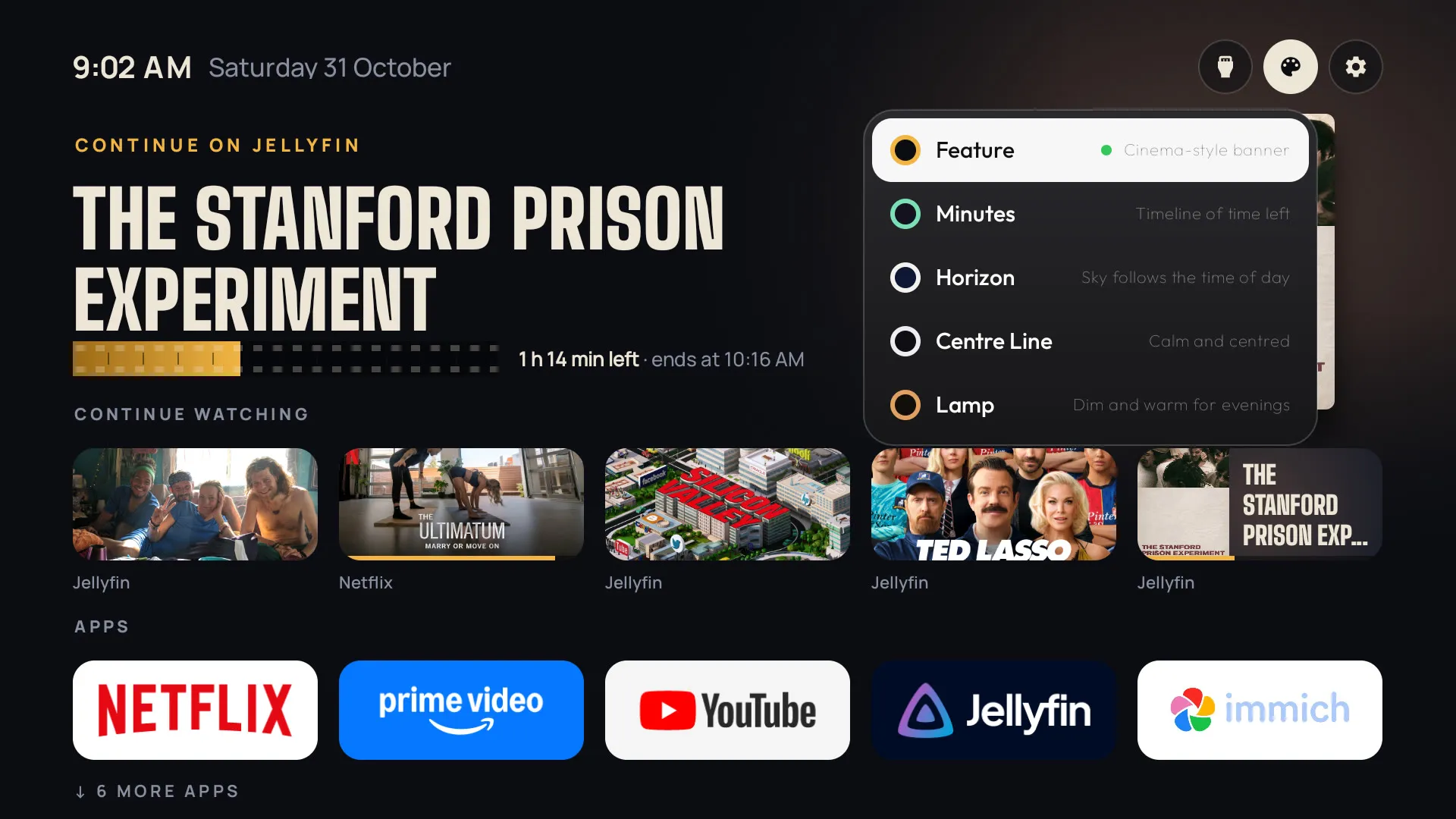
This project is my own build of Gathin23/cleanyourtv, an open source project for cleaning up Android TVs that replaces the stock home screen with a lightweight launcher. I ran it on my TCL 43S450G and then made it mine: a Continue watching row and five home screens I designed myself (Feature, Minutes, Horizon, Centre Line and Lamp), switched with a Themes button right on the TV. I built all of it with Claude Code in a few days.
Goals of the Project
- Get rid of the ads and the slowness. The stock Google TV home screen was full of ads, and the TV felt slow.
- Make it my own. Cleaning up the TV was the starting point, but I knew I could take the launcher further and make something I liked better.
- Come up with my own designs. A home screen is something you look at every day, and I wanted it to look the way I wanted, not the way a TV maker decided.
- Own my software. Every change is reversible, nothing is rooted or uninstalled, and the code is mine to change.
- See how far AI coding agents have come, by building a real Android project on real hardware with one.
Technologies Used
- Android TV: The platform the launcher runs on, here Google TV 11 on a TCL set with 2 GB of RAM.
- Java: The language of the cleanyourtv launcher, and of everything I added to it.
- ADB: How I talked to the TV: disabling packages, installing builds, pressing remote buttons and taking screenshots from my computer.
- Claude Code: The AI agent that wrote the code, from my mock-ups and decisions.
Backstory
Gathin23/cleanyourtv was popular online, and I thought, why not give it a shot? My TV had the usual Google TV problems: ads all over the home screen and a general feeling of slowness. The project’s approach was simple: back everything up, disable the bloat (never uninstall it), and replace the home screen with a small, fast launcher. I ended up disabling 27 packages, including the stock launcher, the voice assistant and Chromecast, and the TV immediately felt better.
But I also knew going in that I could make it my own, and better. The stock launcher is clean, but it’s someone else’s design. So I started with the thing I missed most: a Continue watching row, so the shows I’m halfway through in Jellyfin and Netflix are right there on Home.
Then I got into the fun part. I designed home screens as HTML mock-ups on my laptop, tried a bunch of ideas, and kept five:
- Feature: a big cinema banner of whatever’s focused, with progress shown as a strip of film.
- Minutes: a timeline of how much time is left in each show, shortest first, for “what can I finish before bed?”
- Horizon: a sky that follows the time of day, from dawn to night.
- Centre Line: calm and centred, with stars coming out in the evening.
- Lamp: a dim, warm room where only the focused item is lit, like a lamp following you around.
From there I built them one at a time with Claude Code. The loop was simple: build a step, install it on the TV, look at it, press the real remote, decide what to change. Lamp’s first dim was too dark, so it got lighter. Centre Line had a little focus dot that looked fine in the mock-up but not on the TV, so it went. I tried a sky setting for Horizon and decided the sky should simply follow the clock.
Honestly, there were no big surprises. It was a simple few-day project. That’s what struck me most: how easy it is now to build something like this with an AI agent, and how good the models have become. I made the designs and the decisions, and Claude turned them into working Java on a real TV.
Ending Up in the Showcase
Because my fork adds permissions and goes over the size limit, it was never meant to go back into the original project as a pull request. The project has a Showcase page for exactly that: projects built on top of it that live in their own repositories. I wrote a proper README for the fork with screenshots of all five themes, opened a pull request adding it to the Showcase, and it was merged.